Home Page Maintenance
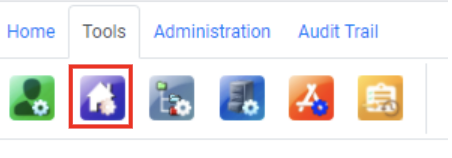
Introduction and Access
JAVLN Officetech contains a Homepage that can be used as an internal notice board, resources list, or basic intranet. The Homepage can contain text, images, tables, links, and any other elements that can be created in MS Word.
Update Homepage
To update the JAVLN Officetech Homepage:
- Click the Homepage Maintenance icon.
- The Homepage will now open in the JAVLN Officetech interface for editing.
- Once you are in Homepage Maintenance mode you will have the ability to format your Homepage to include Tables, External Links, Images and different font colours and sizes.
Within your Homepage you have the following tools available:

1. Format Text

Bold, Italic, Underline and Strikethrough allows for normal MS Word Functionality whereby you are able to Bold, Italic, Underline and Strike though text within the Homepage.

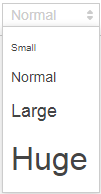
Text sizing allows you to adjust the size of the text required

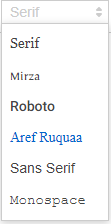
Different Font Types are available to choose from


Text can be directed to sit wherever you require within the Homepage by using the text aligning tools


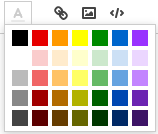
The Font colour can be selected if required
2. External Links
To create an External Link:
1. Type the required URL, highlight the text and select the icon
2. This will open a window which will ask you to enter the Link.
3. Once you have confirmed the link address, click Save.
To open the link when on the JAVLN Officetech Homepage, right click on the link and select Open link in new tab
3. Add an Image
To add an image to your Homepage, select the Image Icon which will open a window to enable you to load an image that you have previously saved.

Whenever you make any required changes to your Homepage, insert images, links, text etc ensure that you click Save to save. Once you have done this you will receive a message that the Homepage has been updated successfully.

Was this article helpful?
That’s Great!
Thank you for your feedback
Sorry! We couldn't be helpful
Thank you for your feedback
Feedback sent
We appreciate your effort and will try to fix the article