Using The Icons Tool Bar To Navigate To Specific Features

Administration and the features are managed via the Tools, Administration and Audit Trail icons. 

Tools Icon
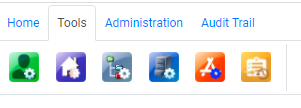

When you select Tools, you can access: 

Function

Description

Client Maintenance

Allows for the creation and modification of Client Folders

Home Page Maintenance

Allows for the modification of the JAVLN Officetech Homepage

Structure Maintenance

Allows for the creation of Structures that can applied to specific Cabinets

Cabinet Settings

Allows for the creation and modification of Cabinets

Template Maintenance

Allows for the creation, modification, and organisation of all templates

Import Task HistoryAllows for the viewing of all Import Task History


Administration Icon

The functions available under the Administration icon include:

Function

Description

Audit Trail

Provides full visibility of all Users’ Audit Trails

Login History

Details dates and times of all Users’ logins

Group and Permission Maintenance

Management of User permissions and details

User & Authentication Maintenance

Create, activate, deactivate and invite new users

Cabinet Access Control (CAC)

Management of Cabinet Access for all Cabinets

Intray Acess Control (IAC)

Provides control access to the User Intrays in your system

Client Access Management

Set up of Client Permission Groups

System Admin Wizard (SAW)

Configuration and management of JAVLN Officetech field lists, Task Statuses, Task categories, Alerts, PDF Stamps, and PDF Passwords

Task Template Manager

Creation and modification of Task Templates

Import Task Template Maintenance

Management of Import Task Templates for the Task Bulk Upload Feature

User Preference

Setting of Folder & Font size

External Link Maintenance

Enables the ability to add customised shortcut links


Audit Trail Icon 

The Audit trail icon stores the access to the Audit Trail records for the Administration functions, System Wizard, User & Group Maintenance, Authentication Management, CAC, IAC, Task Template Structure Maintenance.

Was this article helpful?

That’s Great!

Thank you for your feedback

Sorry! We couldn't be helpful

Thank you for your feedback

Let us know how can we improve this article!

Select at least one of the reasons
CAPTCHA verification is required.

Feedback sent

We appreciate your effort and will try to fix the article
