 JAVLN Officetech: December 2026 release notes |
We ship regular updates to keep JAVLN Officetech stable, secure and running smoothly. This release brings an easier way to add new users, faster document search, smoother saving of emails from Outlook and significant performance and reliability improvements.
Action required
- Everyone will sign in with their email address: After this release, users will need to sign in to JAVLN Officetech with their email address instead of a username. It’s a step up in security, consistent with many other applications, and one less thing for your team to remember.
- You’ll have one password for all your JAVLN Officetech systems: After this release, everyone will need to set a new one. You can do this from the JAVLN Officetech login screen using the Forgot Password? link.
- Steadfast INSIGHT users: If your business uses Steadfast INSIGHT with JAVLN Officetech, update two settings in INSIGHT to keep the connection running. Our step-by-step INSIGHT connection guide shows you how.
If users already have an email address on their profile
No action needed. During the release we’ll automatically copy each user’s email address into their username and they’ll sign in with their email from then on.
If users don’t have an email address on their profile
They won’t be able to sign in after the release until you change their username to a valid email address. To avoid interruption, check your user list in User & Authentication Maintenance before the release and add an email address for anyone without one.
How to add or edit a user’s email address
- As an Administrator, go to Administration and click User & Authentication Maintenance.
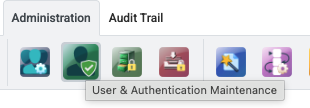
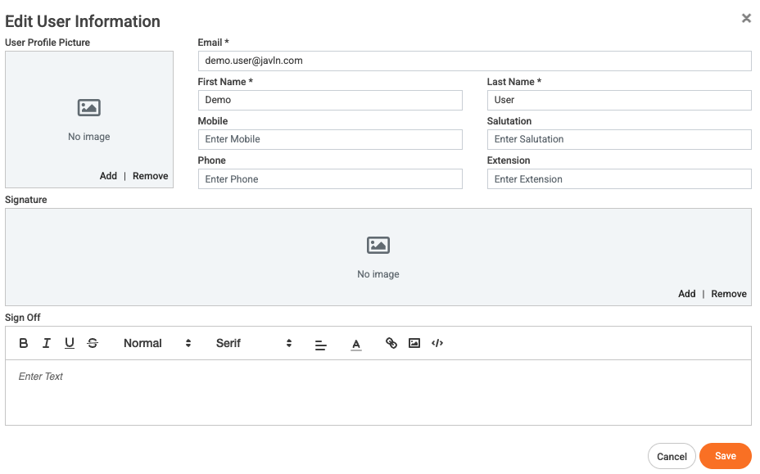
- Find the user in the list and click Edit.
- Add or edit their email address, then click Save.
Note: there is no action required for the Outlook Add-in or ServiceHook in this release. |
What’s in this release
Improved in the December 2026 release
- Inviting and managing users
- Invited users now appear straight away in User & Authentication Maintenance as Invited, so you can set up their groups, cabinets, in-trays and client access before they accept. Before this release, you set up a user’s access after they accepted their invite. People who already use JAVLN Officetech with another broking firm accept with one button and keep their existing password.
- The user list now shows additional statuses (Invited, Invite expired, Awaiting activation, Active, Disabled and Locked). Before this release, the user list showed fewer statuses.
- Document search
- Document Preview now appears beside your search results on the Document Search screen, so you can check a file without extra clicks. Before this release, you opened a file to check it.
- A Cancel button now stops a long search or export. A search with no matches shows ‘We couldn’t find any files matching your criteria.’ in the results area. Before this release, a long search or export couldn’t be stopped and a search with no matches showed a pop-up.
- Repeat searches now return results immediately, thanks to search caching. Before this release, each repeat search ran in full.
- Saving emails from Outlook
- Saving an email from Outlook to JAVLN Officetech now keeps you in Outlook. Before this release, saving an email opened a new browser window.
- Tasks
- Task search now lets you select several statuses, so you can search for every task except Completed ones. Before this release, you could select one status at a time. This was requested by our user community.
- Reports, audit trail and login history
- You can now scope the Client Activity Summary report to any folder within a client, such as an individual claims folder. Before this release, the report covered the whole client.
- Reliability and performance
- Upgraded infrastructure and scale give JAVLN Officetech more consistent performance and resilience. Before this release, JAVLN Officetech ran on its previous infrastructure.
- Search and File Preview now run on dedicated services, so they no longer affect website performance. New and changed documents are searchable within about 15 minutes. Before this release, search and File Preview shared resources with the website.
- Saving .msg and .oft files, opening documents in Word, browsing folders and loading documents from storage now work more reliably. Before this release, these actions were less reliable.
Fixed in the December 2026 release
- Document previews now refresh after a document is saved, so they always show the latest version. Before this release, a preview could show an earlier version after a document was saved.
Outlook Add-in and ServiceHook
This release includes no changes to the Outlook Add-in or ServiceHook. No action is required for either component.
Current versions
- Outlook Add-in: 1.1.2.61
- ServiceHook: 1.1.36.74
These version numbers are provided for reference and are not changes introduced by this release.
Need help? Raise a support ticket at helpdesk.javln.com. If you don’t have JAVLN Helpdesk access, please contact your JAVLN Officetech site administrator, who can raise a support ticket on your behalf. |
Was this article helpful?
That’s Great!
Thank you for your feedback
Sorry! We couldn't be helpful
Thank you for your feedback
Feedback sent
We appreciate your effort and will try to fix the article