 JAVLN Officetech - October 2026 Release Notes JAVLN Officetech - October 2026 Release Notes |
We ship regular updates to keep JAVLN Officetech stable, secure and running smoothly. This release brings an easier way to add new users, faster document search and significant performance and reliability improvements.
Action required: everyone will sign in with their email address
After this release, users will need to sign in to Officetech with their email address instead of a username. It’s a step up in security, consistent with many other applications, and one less thing for your team to remember.
If users already have an email address on their profile
No action needed. During the release we’ll automatically copy each user’s email address into their username and they’ll sign in with their email from then on.
If users don’t have an email address on their profile
They won’t be able to sign in after the release until you change their username to a valid email address. To avoid interruption, check your user list in User & Authentication Maintenance before the release and add an email address for anyone without one.
How to add or edit a user’s email address
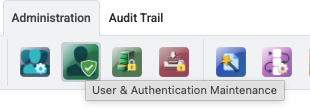
- As an Administrator, go to Administration and click User & Authentication Maintenance.
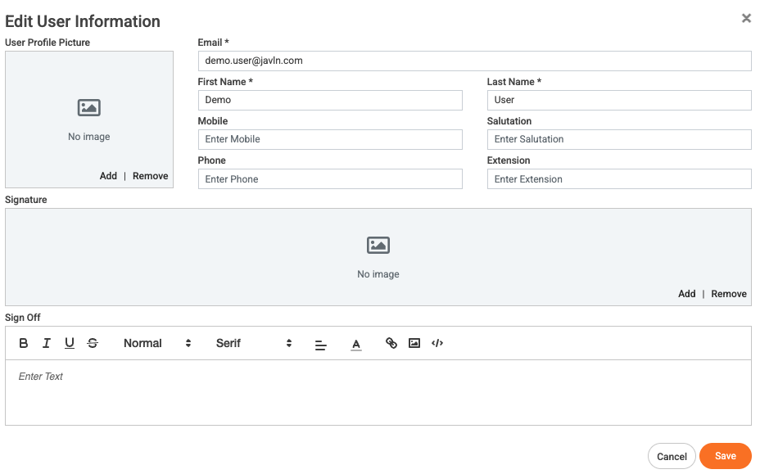
- Find the user in the list and click Edit.
- Add or edit their email address, then click Save.
Note: there is no action required for the Outlook Add-in or ServiceHook in this release. |
What’s in this release
- Inviting and managing users
- Improved: Invited users appear straight away in User & Authentication Maintenance as Invited, so you can set up their groups, cabinets, in-trays and client access before they accept. People who already use Officetech with another brokerage accept with one button and keep their existing password.
- Improved: The user list now shows additional statuses (Invited, Invite expired, Awaiting activation, Active, Disabled and Locked).
- Document search
- Improved: Document Preview now appears beside your search results on the Document Search screen, so you can check a file without extra clicks.
- Improved: A Cancel button now stops a long search or export. A search with no matches shows ‘We couldn’t find any files matching your criteria.’ in the results area instead of a pop-up.
- Improved: Repeat searches now return results immediately, thanks to search caching.
- Tasks
- Improved: Requested by our user community: Task search now lets you select several statuses, so you can search for every task except Completed ones.
- Reports, audit trail and login history
- Improved: You can now scope the Client Activity Summary report to any folder within a client, such as an individual claims folder.
- Reliability and performance
- Fixed: Document previews now refresh after a document is saved, so they always show the latest version.
- Improved: Upgraded infrastructure and scale give Officetech more consistent performance and resilience.
- Improved: Search and File Preview now run on dedicated services, so they no longer affect website performance. New and changed documents are searchable within about 15 minutes.
- Improved: Saving .msg and .oft files, opening documents in Word, browsing folders and loading documents from storage now work more reliably.
Need help? Raise a support ticket at https://helpdesk.javln.com. If you don’t have JAVLN Helpdesk access please contact your JAVLN Officetech site administrator, who can raise a support ticket on your behalf. |
Was this article helpful?
That’s Great!
Thank you for your feedback
Sorry! We couldn't be helpful
Thank you for your feedback
Feedback sent
We appreciate your effort and will try to fix the article