Understanding JAVLN Quote/Policy Statuses and Colour Codes
This guide provides an overview of how quotes and policies are managed within JAVLN, including their lifecycle statuses, numbering conventions, and the colour-coding system used to identify them at a glance.
1. Quote Statuses
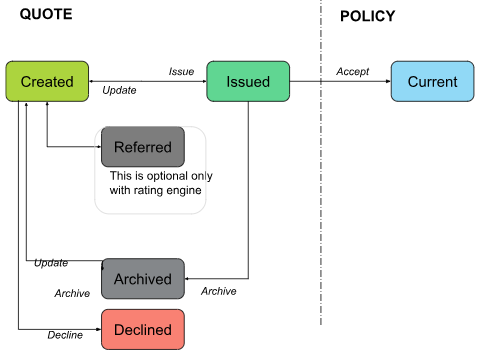
The quote lifecycle tracks the progression from initial creation to either becoming an active policy or being closed out.
Created: The initial stage when a new quote is started to obtain costs for a client.
Issued: The stage where quote details are provided to the client. An issued quote is not yet an active policy and can be updated, accepted, or declined.
Accepted: This action confirms the client has agreed to the quote, transitioning it into an in-force (posted) policy.
Declined: Confirms the client has declined the quote. This action stops the quote's lifecycle and cannot be reversed.
Archived: Used for quotes in 'Created' or 'Issued' status that are no longer moving forward but need to be retained for records.
Referred: Triggered if a rating engine requires a referral. Users must override the referral when appropriate to proceed with the quote.
2. Policy Statuses
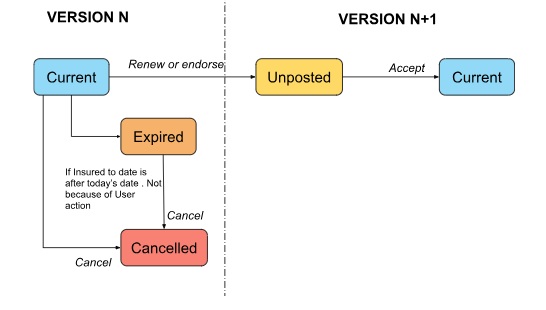
Policy statuses indicate the current standing of a posted insurance contract.
Current Policy: A policy remains in this status as long as the "Insured to Date" is today or in the future.
Unposted Policy: A new version created via renewal or endorsement that has not yet been finalized.
Cancelled: Stops the policy lifecycle. This is only possible on the latest version if no unposted endorsements or renewals exist.
Expired: A system-generated status that occurs automatically when the "Insured to Date" is older than today's date.
3. Policy Numbering
JAVLN uses a consistent numbering sequence for the entire lifecycle of a policy.
Prefixes: Numbers can include a 3-character product abbreviation prefix.
Version Tracking: The base policy number stays the same, but JAVLN appends a sequence number for each renewal or endorsement to maintain a clear history.
4. Colour Code Reference
JAVLN uses specific colours to help users quickly identify the status of a record.
| Colour | Meaning/Status |
| ● Lime Green | Created Quote |
| ● Green | Issued Quote (not yet accepted) |
| ● Blue | Posted / Current Policy |
| ● Yellow | Unposted |
| ● Orange | Expired |
| ● Red | Declined Quote OR Cancelled Policy |
| ● Grey | Referred |
| ʘ Lime Green with a dot | Created Migrated quote |
| ʘ Lime Green with a dot | Current Migrated quote |
| ʘ Orange with a dot | Expired Migrated quote |
| ʘ Green with a dot | Expired Migrated quote |
| ʘ Red with a dot | Expired Migrated quote |
Was this article helpful?
That’s Great!
Thank you for your feedback
Sorry! We couldn't be helpful
Thank you for your feedback
Feedback sent
We appreciate your effort and will try to fix the article