The JAVLN Officetech Outlook add-in puts your client and policy information beside your inbox, so you can file emails and pull up records without leaving Outlook.
Here's how to install it.
Step 1: Check whether you already have it
Open Outlook and look for the JAVLN navigation bar.
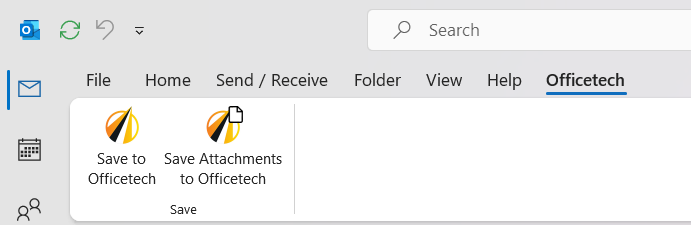
Not there: you do not have the add-in yet. Skip to Step 3
Already there: you have an older version. Start at Step 2.
Important: the installer will not update an existing add-in. If you already have it, remove the old version first. Installing over the top is the most common reason a reinstall fails.
Step 2: Remove the old version
Close the Outlook before you start. The uninstall will not finish cleanly while Outlook is running.
Press Windows key + I to open Settings, go to Apps > Installed apps, then search for JAVLN Officetech Outlook Add-in (or similar). Select it, click Uninstall and follow the prompts.
Step 3: Download the installer
Download the latest version here: JAVLN Officetech Outlook Add-in.
Step 4: Run the installer
Make sure Outlook is closed, then run the installer file and follow the on screen instructions.
Step 5: Open Outlook
The JAVLN navigation bar will appear and you are ready to go.
Why the JAVLN navigation bar may not appear straight away
Outlook sometimes switches an add-in off after a crash or a slow start, so the navigation bar goes missing even though the install worked. Turning it back on takes a few seconds: go to File > Options > Add-ins, set Manage to COM Add-ins, click Go, tick JAVLN Officetech Outlook Add-in and restart Outlook.
Microsoft's own guide cover this too: Use add-ins in Outlook
Still stuck? Raise a support ticket at https://helpdesk.javln.com. If you don’t have JAVLN Helpdesk access please contact your JAVLN Officetech site administrator, who can raise a support ticket on your behalf.
Was this article helpful?
That’s Great!
Thank you for your feedback
Sorry! We couldn't be helpful
Thank you for your feedback
Feedback sent
We appreciate your effort and will try to fix the article